
In the first three articles of this series, I built a stateful LangGraph agent that handles a 15-minute booking process, wrapped it with a Streamlit UI to enhance user experience, and added a proper backend with a Postgres database. This article focuses on testing that backend using both Docker and a hosted Postgres service.
The journey of this AI agent began with a conversation I had with a customer service representative for a cleaning service. The agent mimics a real customer service representative, orchestrating the entire booking process. Built on LangGraph, it handles:
- Responding to customer queries and understanding their needs.
- Calculating service prices and informing the customer.
- Managing customer acceptance or rejection.
- Proposing optimized time slots.
- Confirming and recording appointments.
By 2026, LangGraph and Postgres have become staples in agentic AI stacks, offering robust state management and persistence. The full source code is available on GitHub at customer-service-agent—feel free to clone the repo and test it yourself.
Agent Structure
The following diagram illustrates the structure (i.e., graph workflow) of our AI agent:
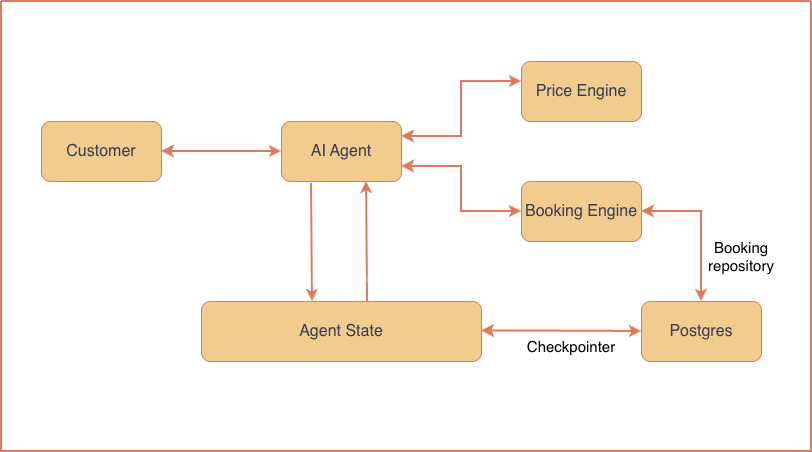
Conversation progress lives in LangGraph's AgentState and is saved as checkpoints. When the agent offers time slots, it reads existing bookings from the database to avoid proposing times that are already taken. This ensures synchronization between the agent's state and the database, preventing double-booking and enhancing reliability.
Running the Backend Locally with Docker
To run the backend locally, Docker Compose is the simplest approach. The included docker-compose.yml spins up a Postgres container with the necessary configuration. Ensure you have Docker installed, then run:
docker-compose up -dThis will start a Postgres instance on your local machine. The agent connects to it using environment variables defined in a .env file, which you can copy from the repository's example. Once the container is running, you can launch the agent and test the full workflow seamlessly.
Testing with a Hosted Postgres
For cloud-based testing, you can use a managed Postgres provider like Neon, Supabase, or AWS RDS. These services offer generous free tiers as of 2026, making them ideal for development. Simply create an instance, retrieve the connection string, and update your environment variables. The agent will connect over SSL, ensuring secure data transfer. This approach is great for testing your agent in a production-like environment without the overhead of local infrastructure.
Conclusion
In this article, you learned how to run the Postgres backend for your LangGraph agent both locally via Docker and in the cloud with a hosted service. These methods provide flexibility for development and testing. Next, you might explore deploying the entire stack to a cloud platform or integrating additional services like Redis for caching.